Content Management System for Mobile Apps
Making static content dynamic: designing a corporate CMS from scratch to power mobile apps across multiple countries
Disclaimer
This case study is based on a real project; however, due to confidentiality obligations and a non-disclosure agreement (NDA), certain details have been modified. Product names, visuals, data, metrics, timelines, and specific implementation details have been altered or generalized. The information presented reflects the scope and nature of work, but does not represent the exact proprietary materials or internal data.
Specifications
Team
Product Manager • Business & System Analysts • UX Researcher • Solutions Architect • Product Designers • Frontend & Backend Developers • DevOps • Marketing
Role
Product Designer
Duration
Stage 1: 5,5 months
May – Dec 2025
Overview
Mobile Apps Management
Building the foundation
Acme Global, a multinational corporation selling FMCG products, operates a number of mobile apps across different regions, including Acme Start, Creators+, Acme Events, Healthy Home, and others.
The apps focus on health and wellness programs, and while they help the company achieve marketing and customer acquisition goals, they also create operational pressure. Continuous updates are required, especially since all of them are hard-coded.
For years, the idea of introducing a centralized Content Management System (CMS) for apps was discussed but never implemented due to high upfront investment.
However, 2025 became a game changer for the company. The team launched several new products and ran large-scale campaigns tied to them. The need for a solution became urgent. It finally accelerated a decision to build corporate CMS.
Business operations of Acme include four countries in Central Asia. In 2025 the region was preparing to launch a new app and was selected as the pilot for CMS rollout. If successful, the solution would later be scaled across the broader APAC and eventually implemented globally.
Challenges
Strategic Considerations
Key risks and constraints
#1. High Initial Investment
While a CMS would significantly reduce pressure on teams, timelines, and budgets in the long term, building such a system from scratch requires substantial upfront investment.
Mitigates: Cost-benefit analyses demonstrating long-term ROI and operational efficiency gains.
#2. Migration of Existing Apps
Multiple live apps need to be integrated into the future CMS without disrupting operations.
Mitigates: Two-years migration roadmap outlining phases, dependencies, and key milestones.
#3. Global Scalability
Acme operates across diverse markets, each with unique requirements. A CMS designed for one region might not be suitable for others.
Mitigates: Validating CMS model locally in one region before scaling globally.
Research
Discovery Phase
Interviews with teams across countries
UX research process included multiple methods and frameworks. We interviewed colleagues from marketing, operations and support teams across several countries, as they would be the primary users of the future CMS.
Some of the key insights are illustrated below.
Insights
Workflow Inefficiencies
Visualizing the future shift
Major inefficiencies in the current workflow are related to manual processes and heavy dependence on design and engineering teams. Even small changes require multiple approvals and hand-offs, causing delays, especially during campaign launches.
The current and desired states are visualized through User Journey Maps, illustrating both the existing workflow and the future CMS-driven process.
Slide to compare changes
Blueprint
System Structure
Information architecture & user flows
To build a product that could scale both regionally and globally, we conducted market research, analyzing existing CMS platforms and reviewing international industry practices.
The findings helped us create the first blueprint of the information architecture (IA) and user flows (UF), which however evolved significantly throughout the design process.
The images below show some of our early drafts exploring the system’s structure and navigation.
Design Process
Implementation Plan
Phased rollout approach
Given the scale and complexity of the CMS, we divided the project into several phases, prioritizing resources availability, time to market, and business impact:
Phase 1: Asset Library
The foundation of the CMS, enabling teams to upload and manage assets across corporate apps.
Phase 2: Program Library
A centralized hub for managing health and wellness promotional programs. One of the key tools for marketing initiatives.
Phase 3: Content Management
A blueprint for populating content to the Programs Library.
Phase 4. Releases
Version history, tracking changes, and backlog management, maintained jointly by marketing and development teams.
Phase 5. ASO
App Stores Optimization tools for improving ratings. Managed by the SEO team.
Phase 6. Dashboard
A centralized dashboard providing insights for different teams.
Phase 7. Settings & Help Center
Administrative controls for system configuration, user permissions, and user support resources.
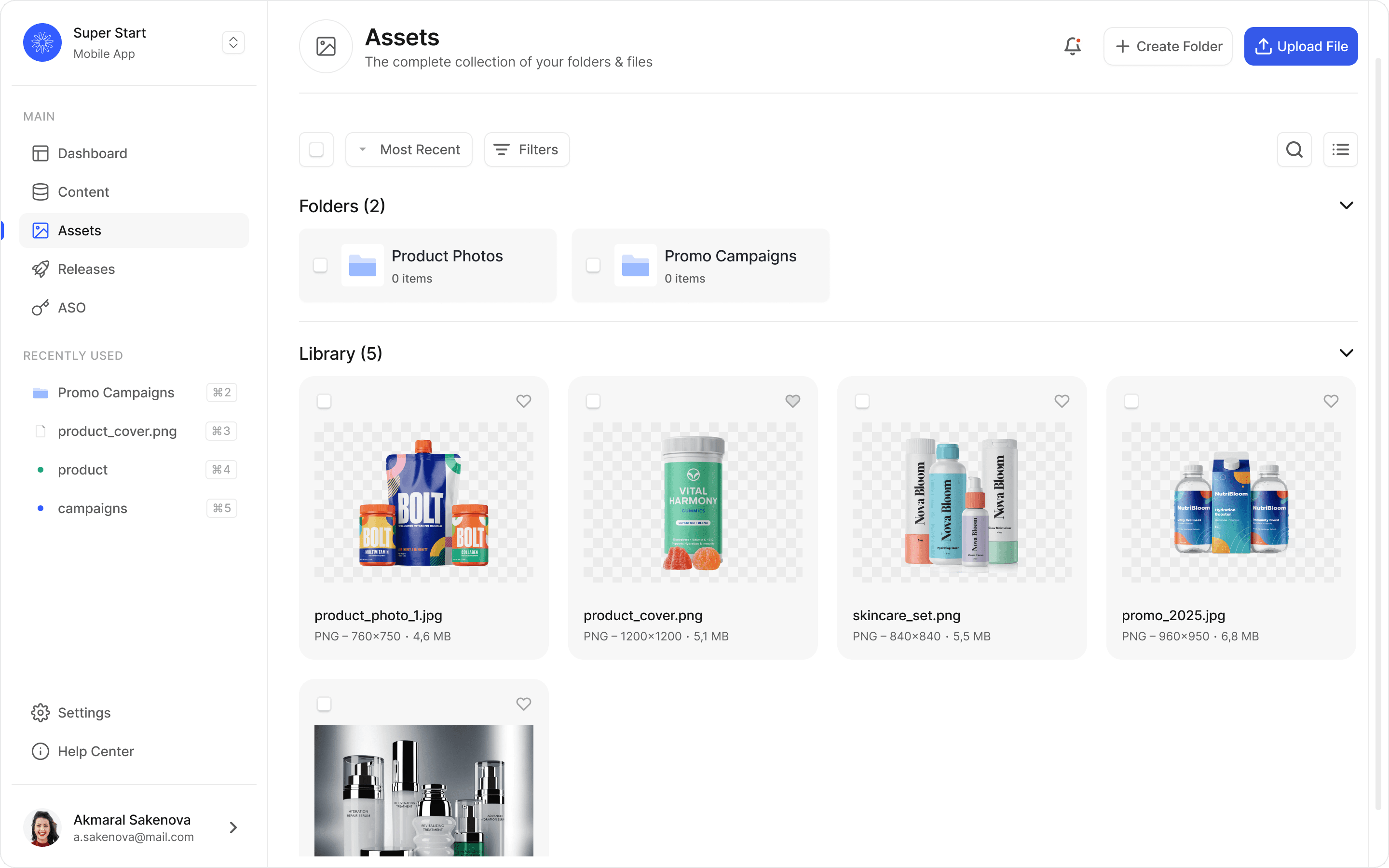
We kicked off the design process with Phase 1: Asset Library, focusing on workflows for managing files. The following summary demonstrates the design process and key highlights from scenarios.
Scenario #1. Add File
Base use case demonstrating the Start Screen and the actions a user can perform on it.
In the initial design, users were only able to start by creating a folder, and could add files to it afterward. However, after a series of interviews with our colleagues, we discovered that they work with standalone files just as frequently as with folders. As a result, we updated the design to allow them to create folders or upload files directly. The Upload File button was made the primary action.
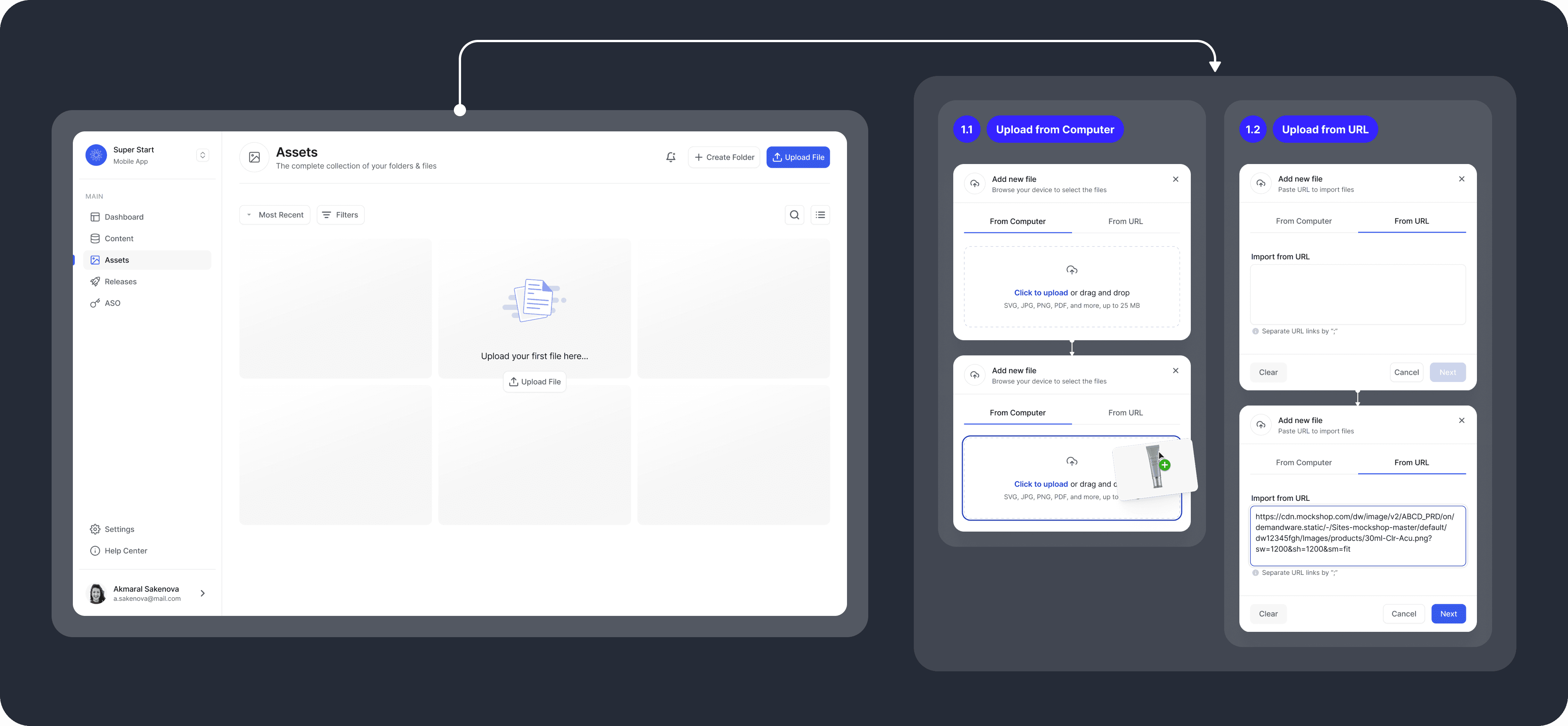
File upload functionality was also refined. In the first iteration users could only drag and drop files or manually upload attachments from their device. During research, we found that teams also work with other internal Acme systems, that store corporate files. We added the option to upload files via URL enabling automatic synchronization between systems.
Scenario 1.1 demonstrates uploading from a device, while Scenario 1.2 shows uploading via URL.
Upload State
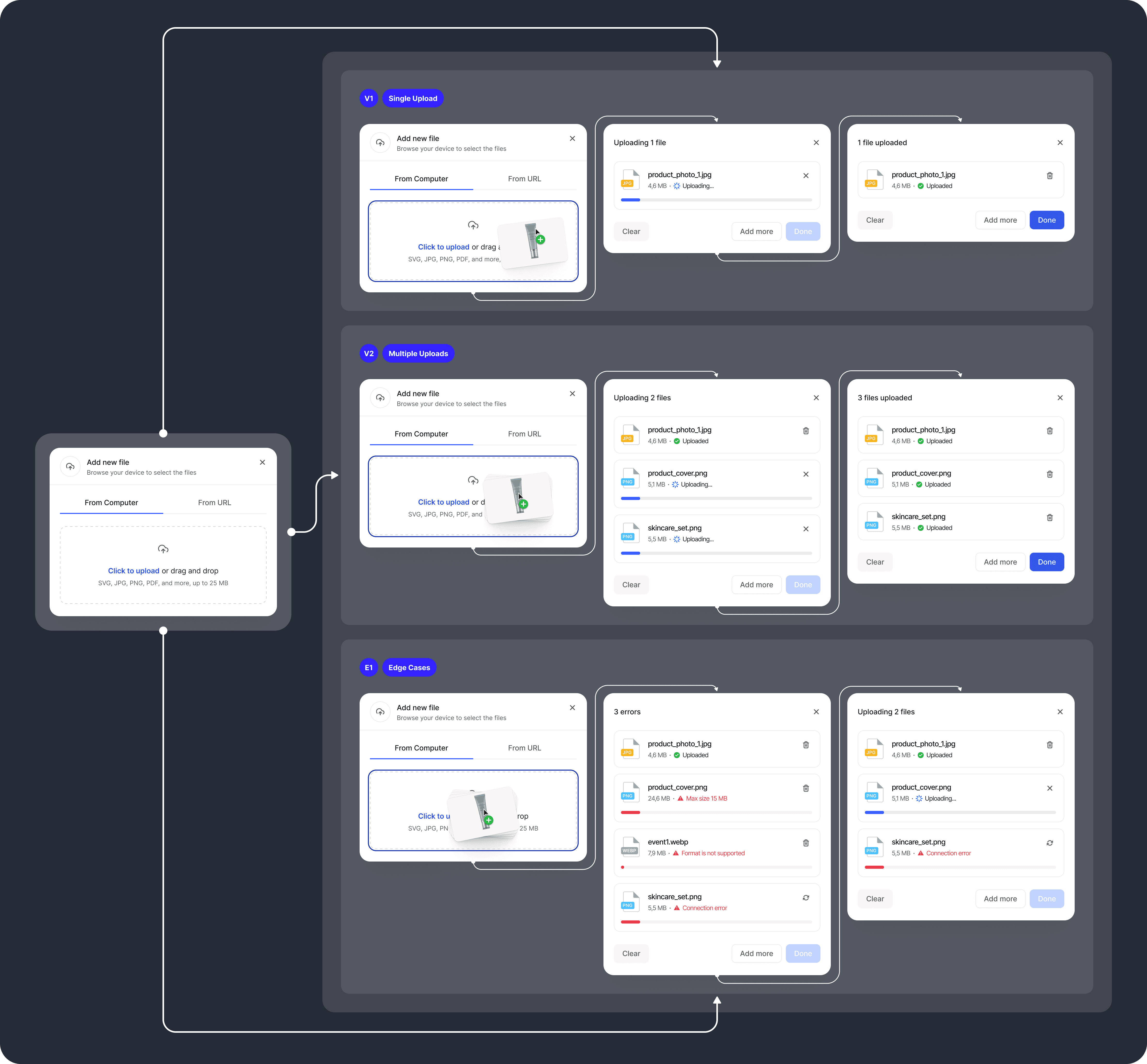
Users frequently work with many files at once, so it became clear that the CMS needs to support bulk uploads. The visuals below illustrate system states for single and multiple uploads. Each file includes a progress bar indicating the remaining upload progress.
During design discussions we also considered edge cases, such as unsupported file formats, oversized files, or connection failures.
The initial idea was to disable uploads by default. However, testing revealed that users benefit more from immediate feedback on each file, rather than having uploads silently blocked. We introduced alerts to clearly communicate the status of every file during upload.
Upload Confirmation
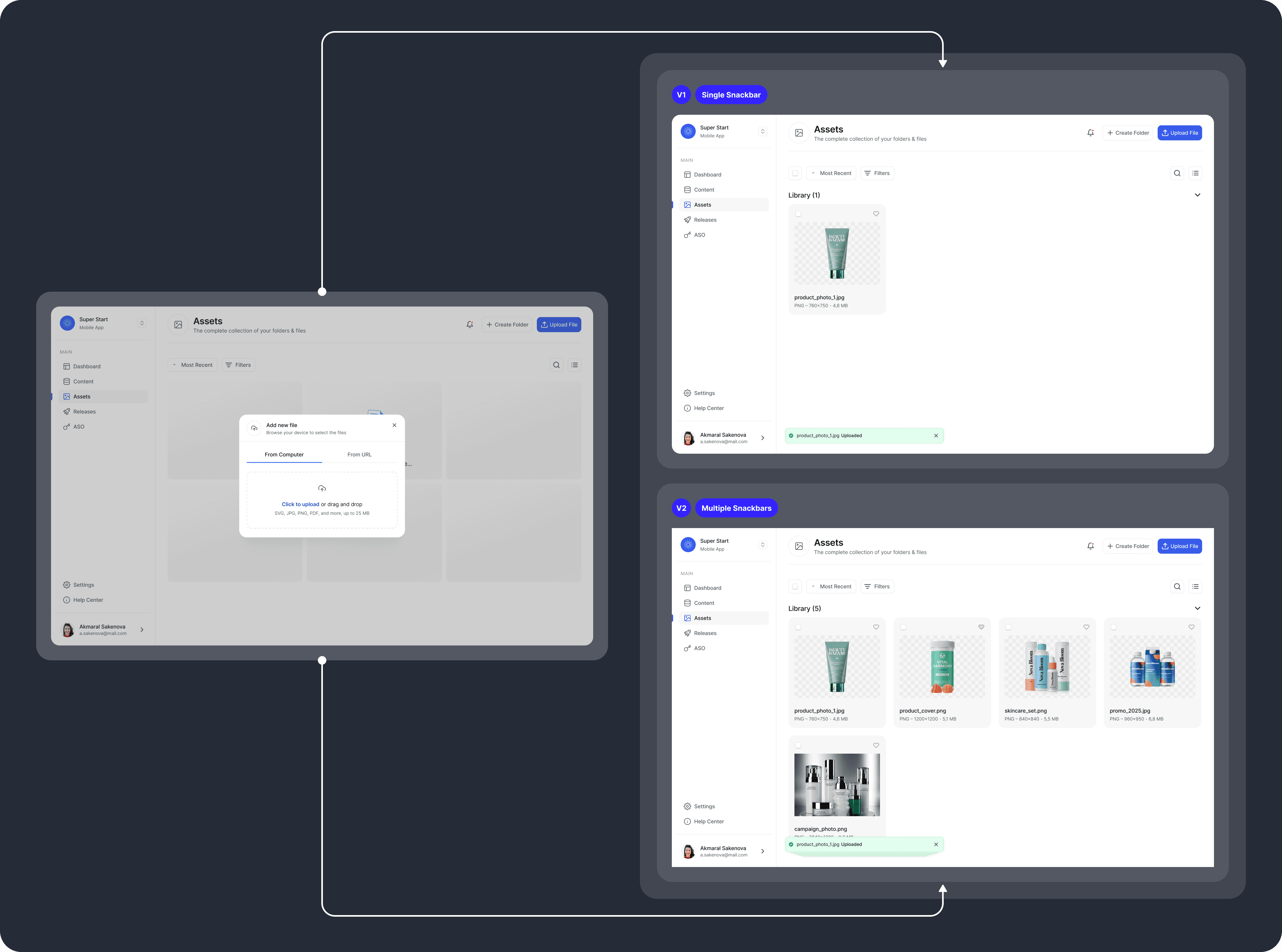
To provide users with system feedback when uploads are completed, snackbars were implemented. Each snackbar disappears after six seconds automatically.
When multiple files are uploaded at once, snackbars stack on top of each other and can be expanded individually.
Scenario #2. Create Folder
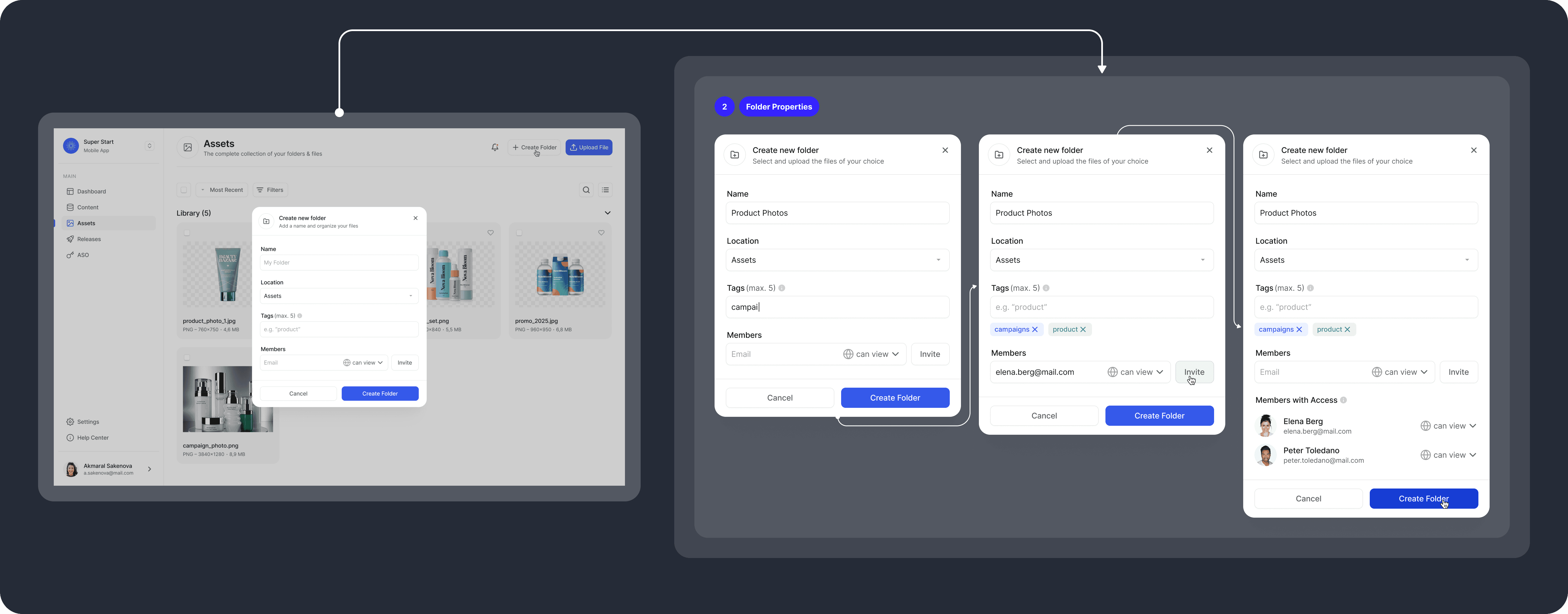
In addition to uploading files directly to the Asset Library, users can create folders both on the start page and within existing folders.
Folders help organize files and include properties such as name, tags, and location. Users can also invite other members to collaborate on specific folders with either view-only or edit access.
All folder properties are editable.
Recently Used
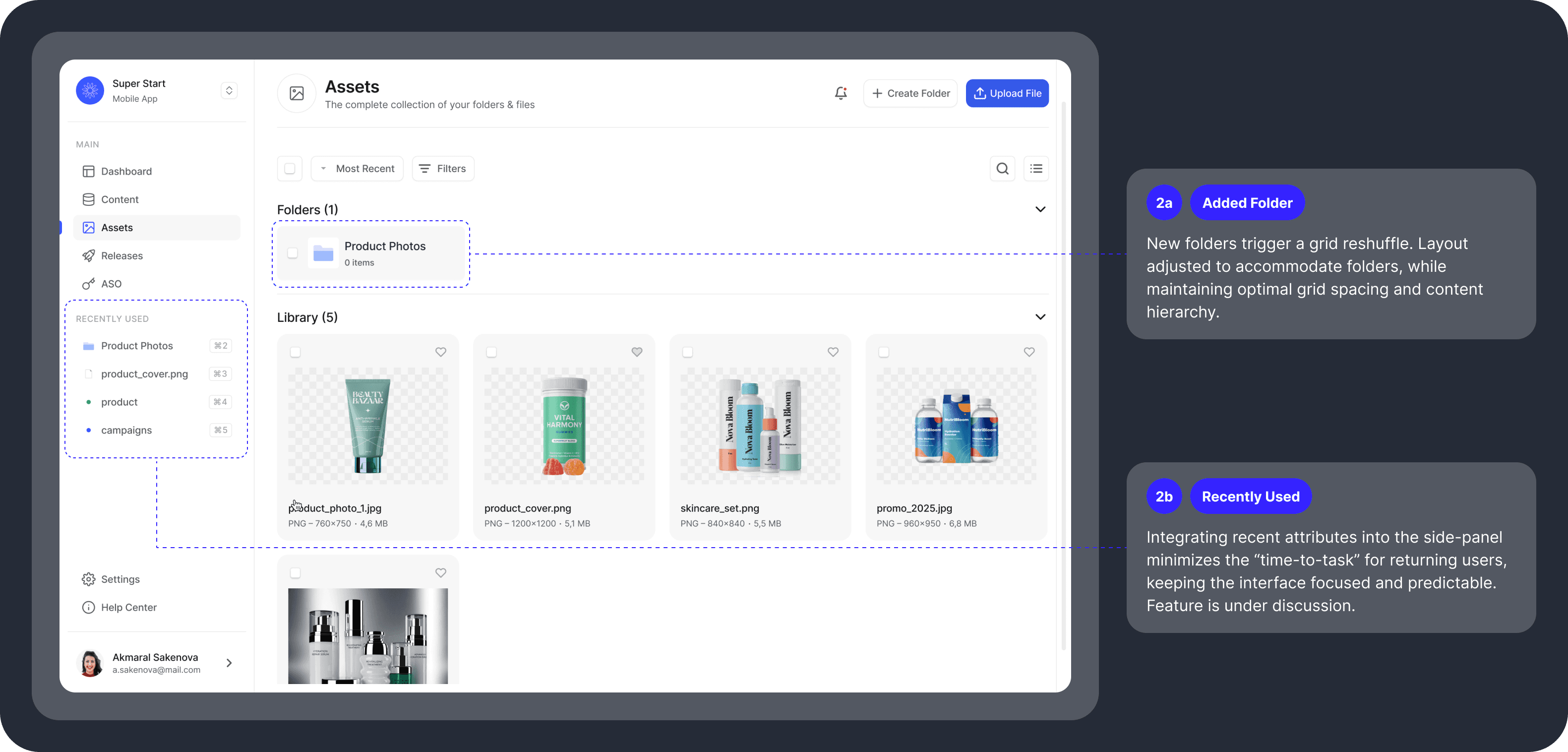
To help users quickly access frequently used items, we introduced an experimental Recently Used panel in the sidebar. The panel appears automatically after the first folder is created and includes recently used folders, files, and tags.
Our hypothesis is that easier access to these items improves workflow efficiency.
The feature is currently being tested, and we are evaluating whether it should remain, be removed, or allow manual hiding.
Scenario #3. File Actions
Each file supports several actions, including moving, deleting, viewing, filtering, and sorting.
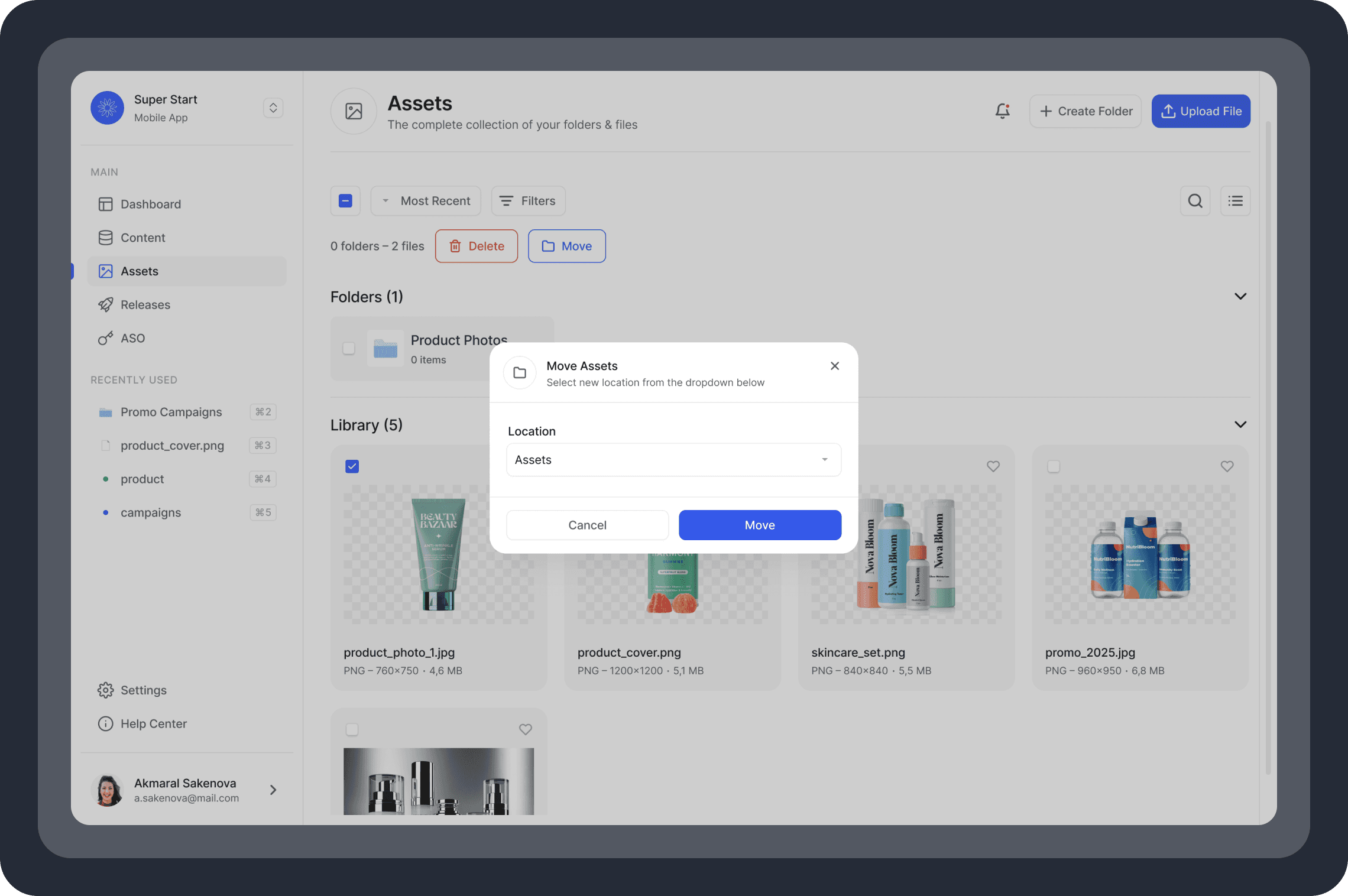
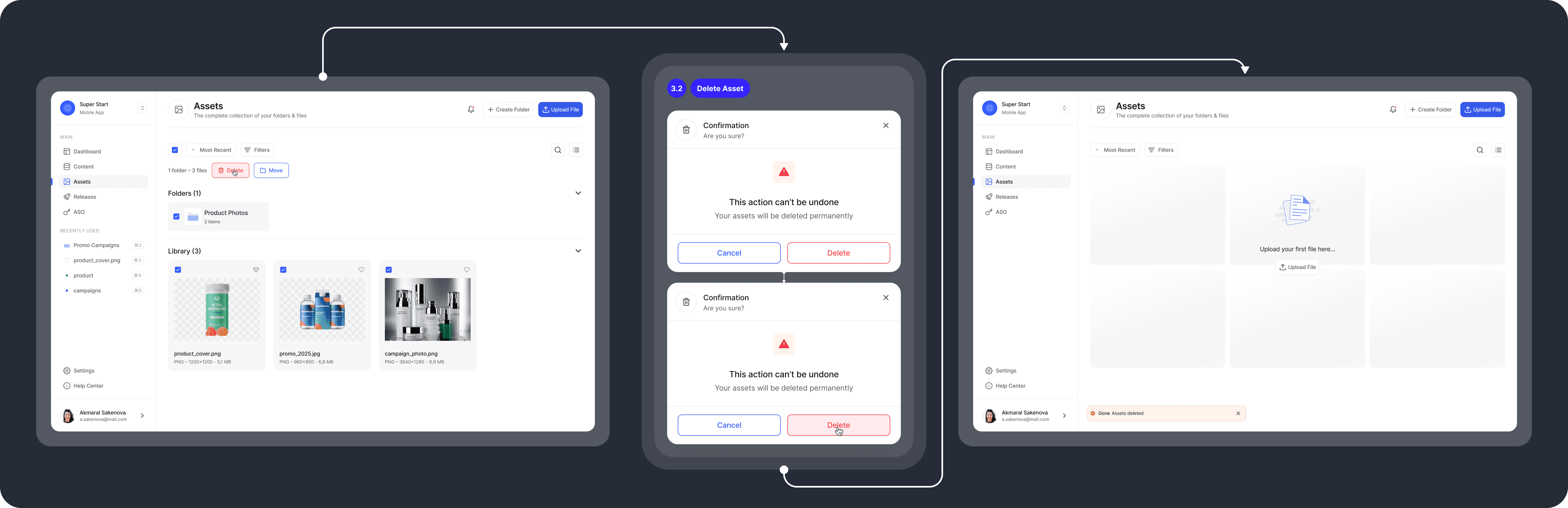
When users perform the Move or Delete action, a confirmation dialog appears with a dimmed background to help prevent accidental changes.
Move Files
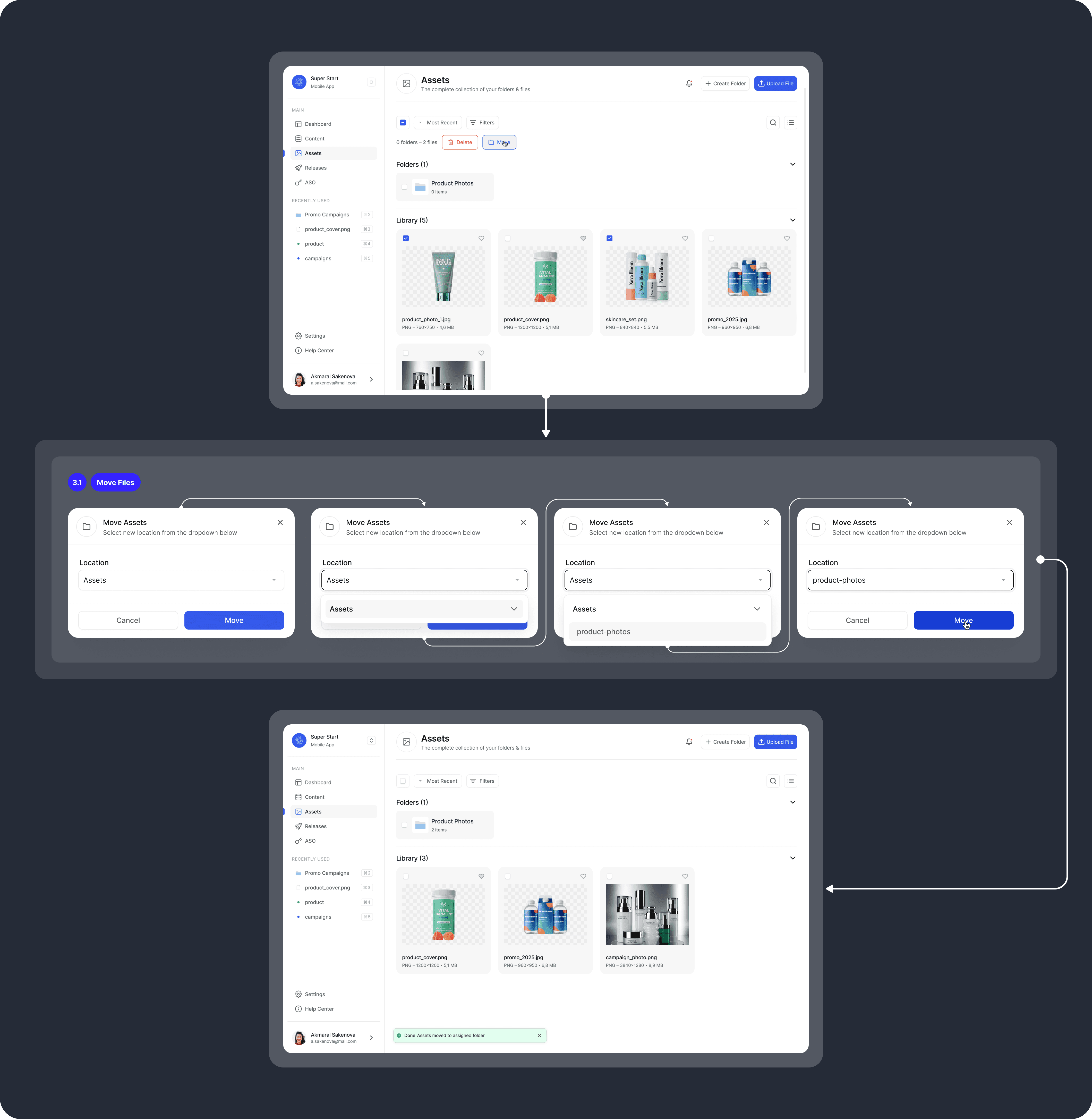
Users can move one or more files to another location, such as folders in the Asset Library, nested folders, or back to the Library itself.
After a file is moved, the system confirms the action with a snackbar notification.
Delete Files
The system allows users to delete one or more files at once. To prevent accidental deletion, a confirmation dialog prompts users to confirm the action.
After the files are deleted, a snackbar notification confirms the action.
The snackbar color was changed from green to orange. Although the message confirms the action, deletion is still considered a negative operation. To avoid associations with positive actions, the snackbar uses orange instead of green.
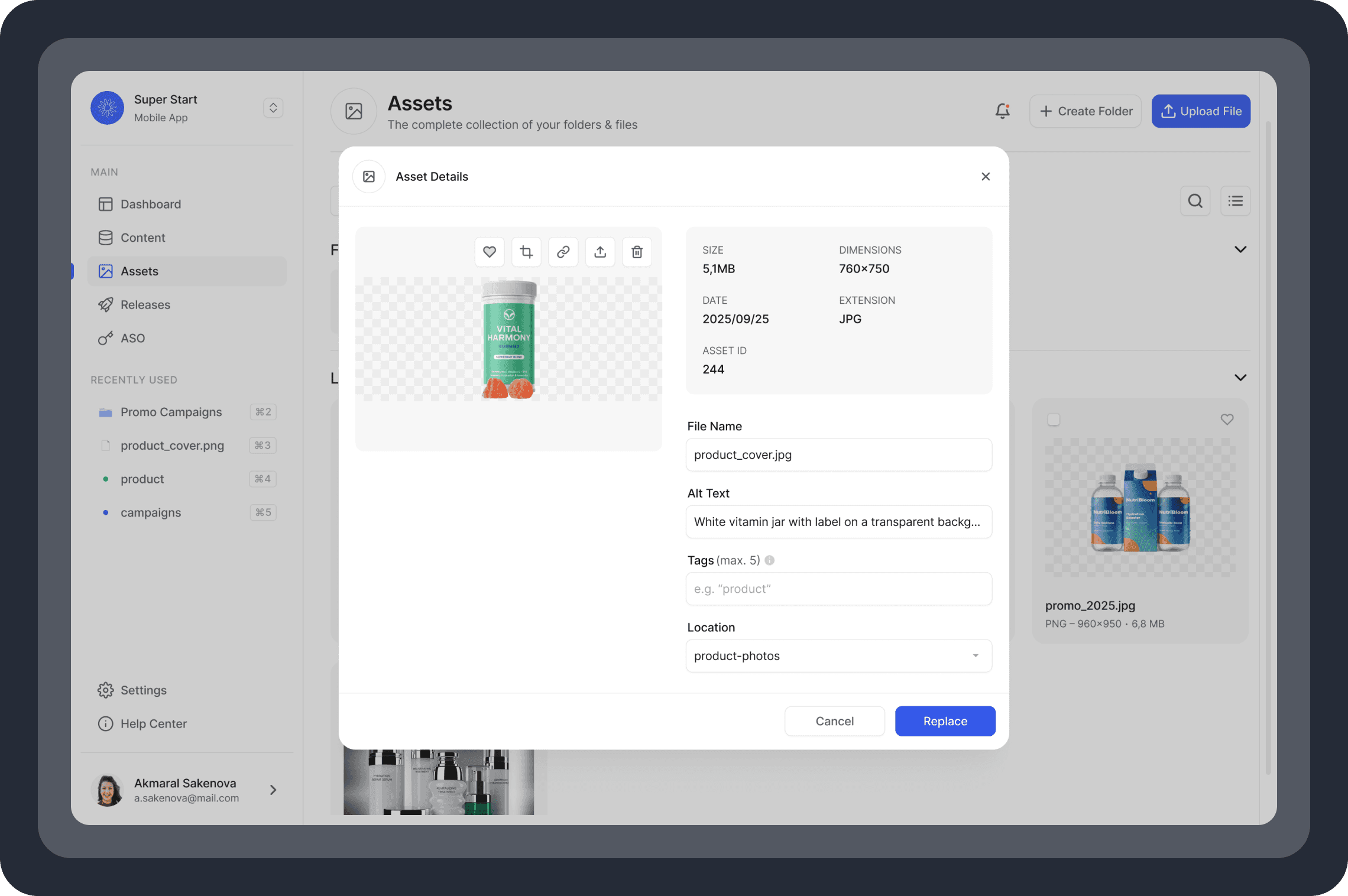
View File
When viewing a file, users can perform key actions, such as marking it as a favorite, cropping, linking, sharing, or deleting it. Users can also manage metadata, including renaming file, adding alt text, assigning tags, or moving it to a different location.
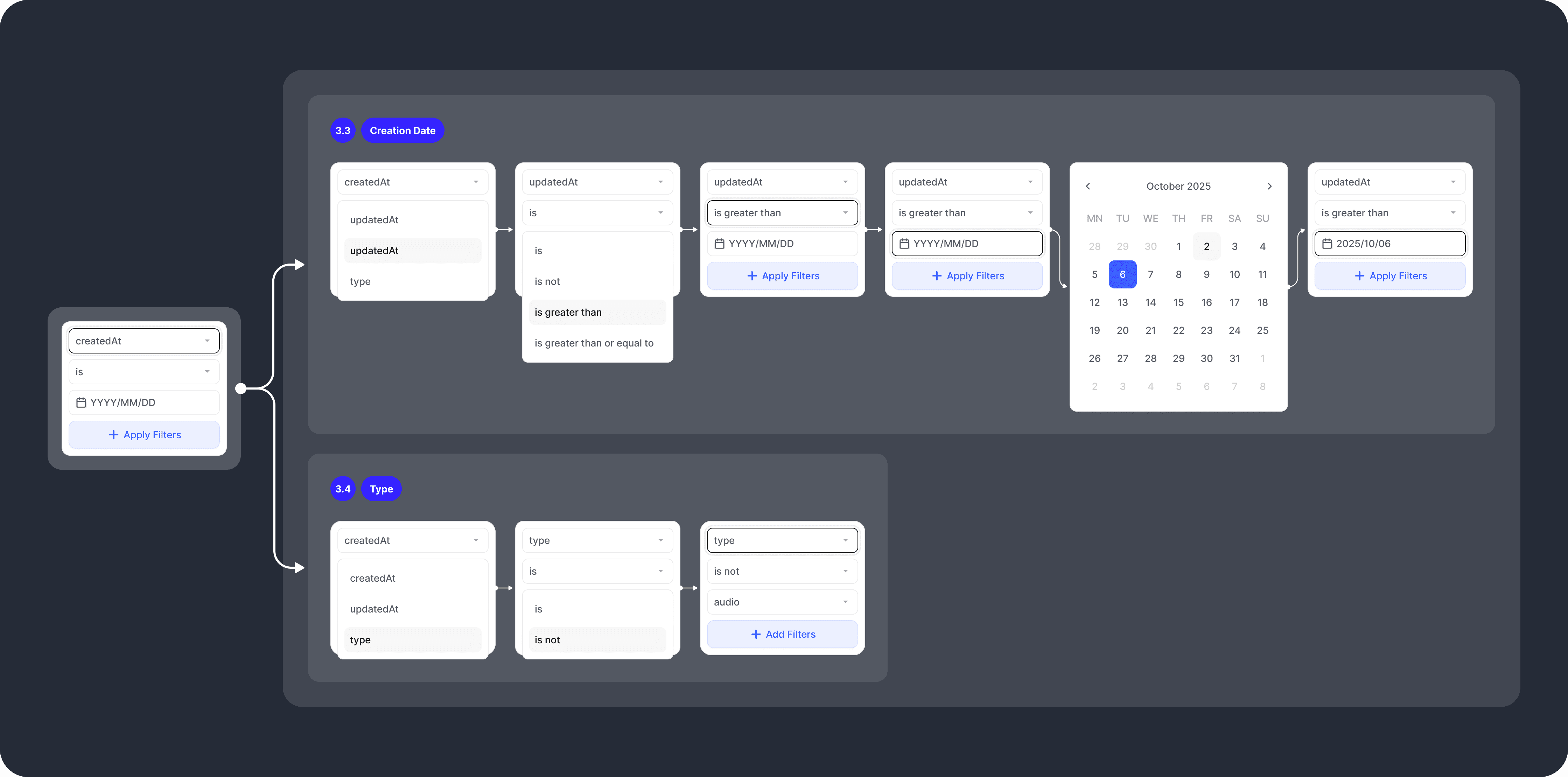
Apply Filters
To simplify navigation in the Asset Library, we introduced filters. Users can sort files by date or type and refine results using typical conditions like is, is not, greater than, or greater than or equal to. This helps users to quickly find specific files, especially as the Library grows, improving overall workflow efficiency.
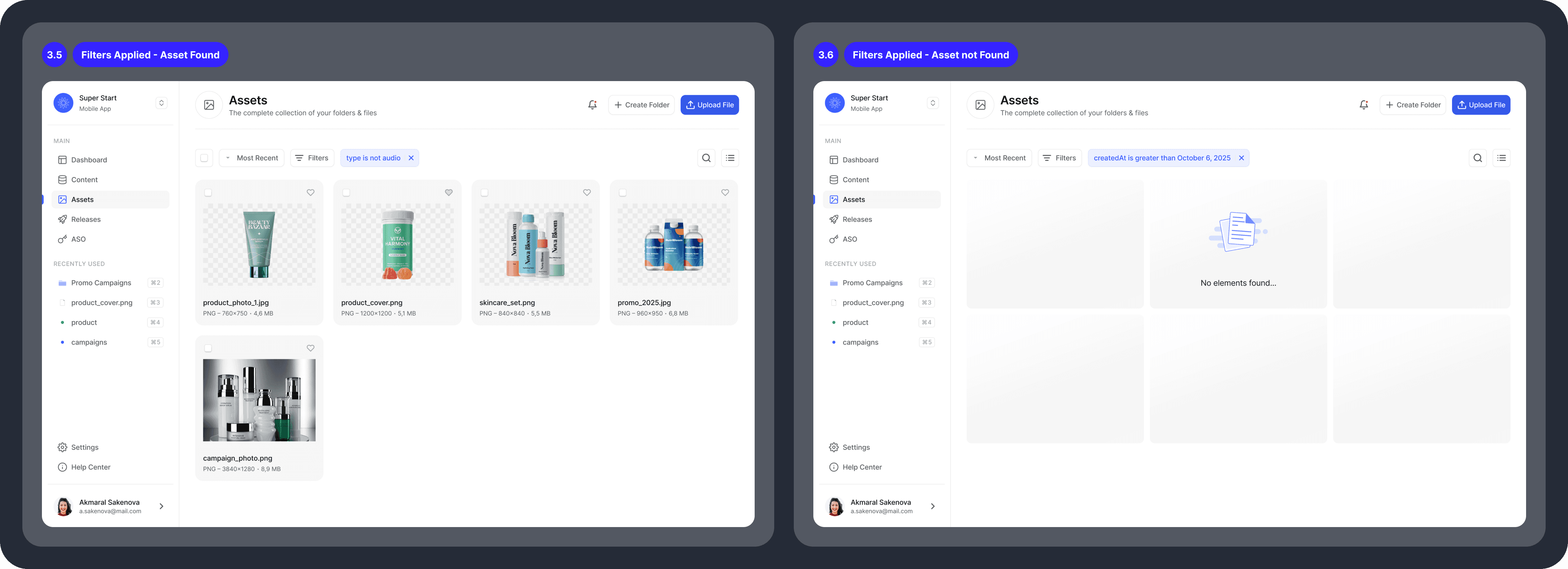
Active Filters
When filters are applied, the system displays results depending on whether matching files exist.
The screens below demonstrate the system’s behavior in two scenarios: a file is found, and no matching files are returned.
WIP #1. View Presentation
While the first phase of the Asset Library has been released and rolled out for testing, some features remain a work-in-progress (WIP).
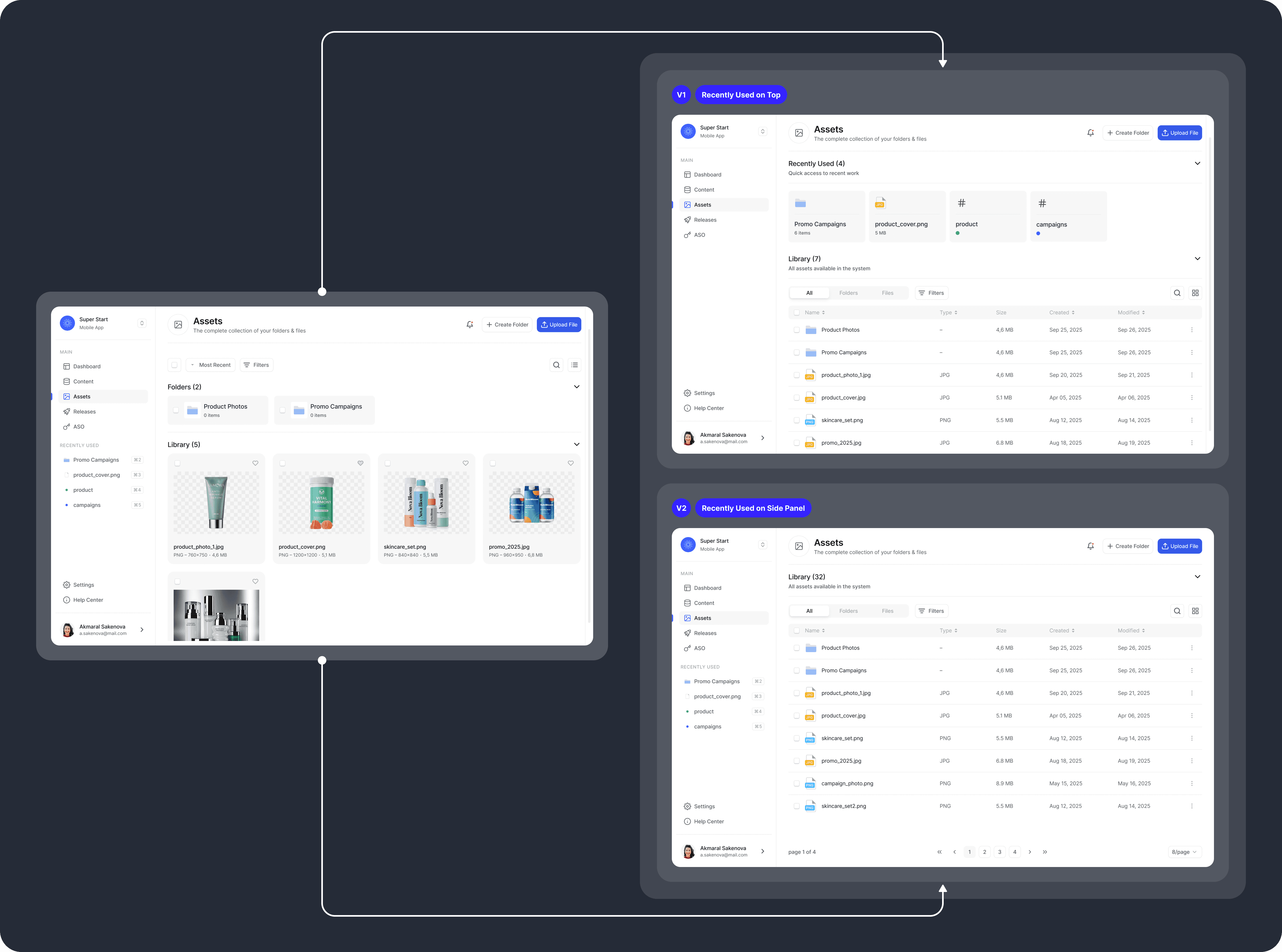
In particular, we are still refining the view presentation. The MVP version currently supports only a tile view. However, as the system grows and more files are added, users need both a tile view and a list view.
The list view provides a compact layout, making it easier to manage workspaces with many items. The tile view, on the other hand, is better suited for visually browsing content.
The screen below demonstrates the proposed list view options, which are still under discussion. We are exploring whether users would benefit more from having recently used assets in a top panel or if a simple paginated list view is sufficient.
WIP #2. Changelog
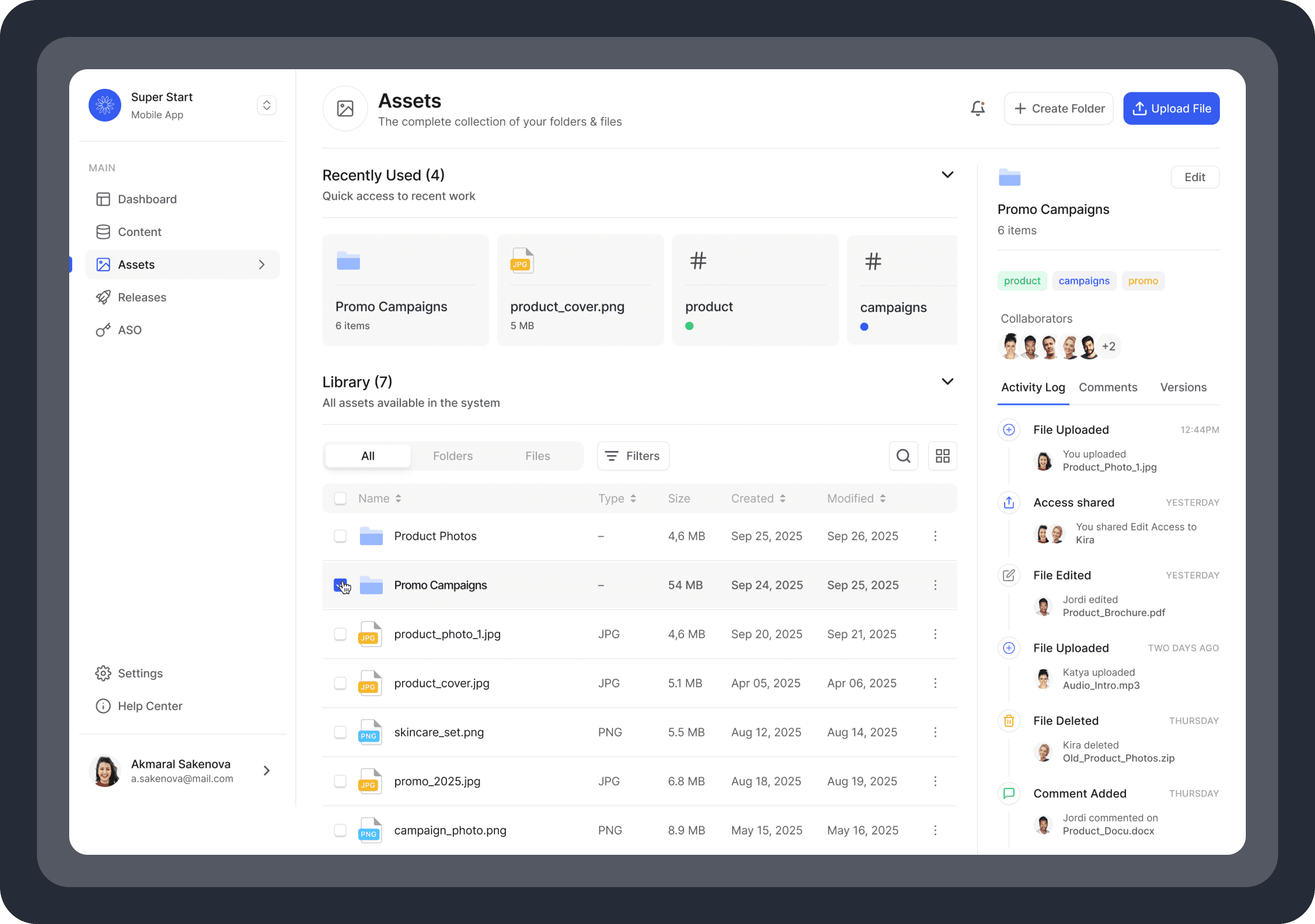
Changelog is another work-in-progress that we are currently reviewing. While not essential for the MVP, it improves visibility and provides greater control over actions happening around assets.
So far this feature has been developed for folders, showing what changed, when, and by whom, helping teams stay aligned and aware of ongoing activity.
Changelog for files is still under development and will be released later.
Next Steps
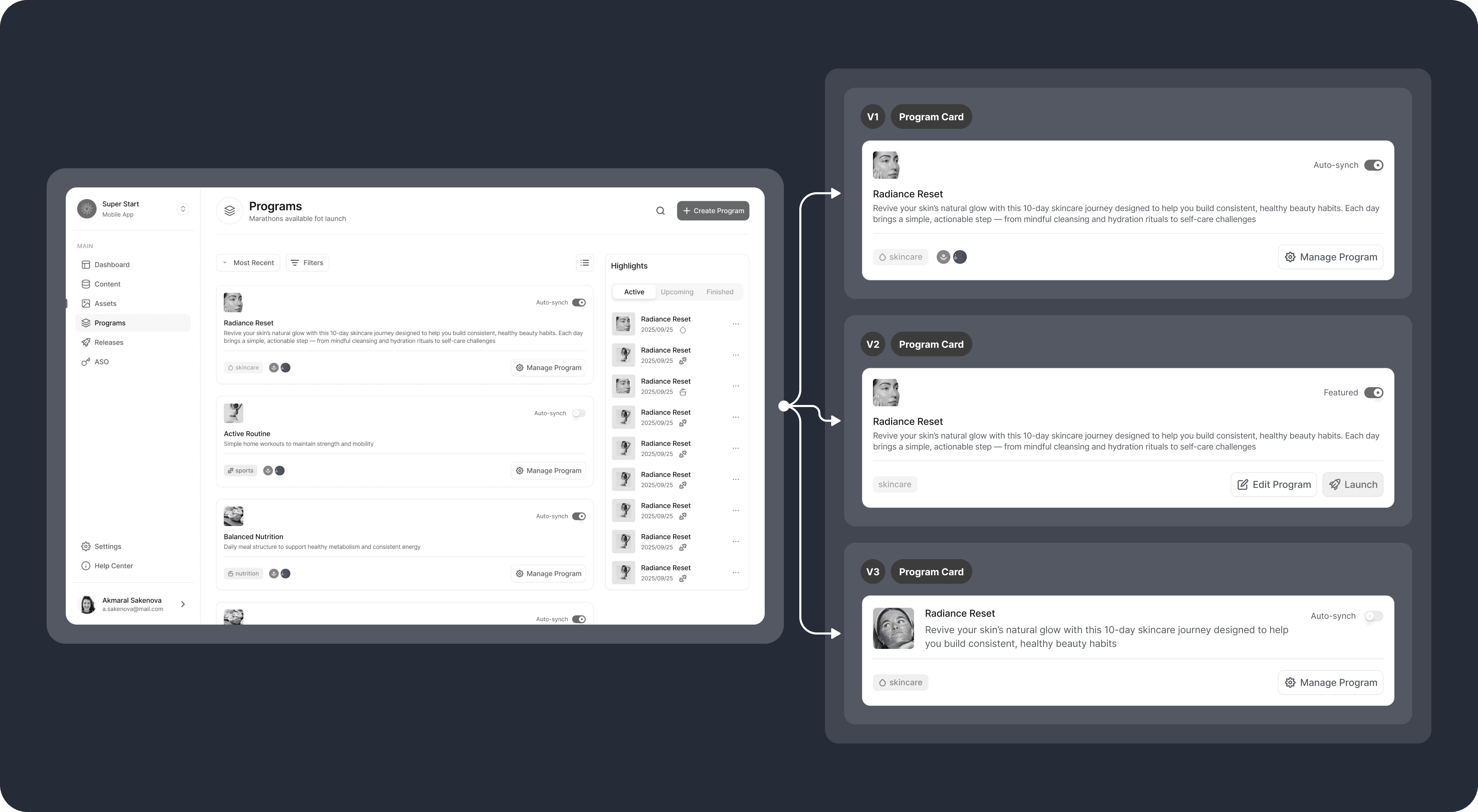
The second phase, conducted in parallel with phase one, focuses on Programs, a central hub for managing health and wellness campaigns and a core tool for marketing initiatives. This feature allows CMS users to create new marathons, edit or delete existing ones, and publish them to mobile apps.
Below are preview images illustrating the scenarios we are currently working on. The program card is being tested to ensure it provides an optimal user experience and makes managing programs more efficient.
The Programs feature, together with the Asset Library and the third feature, Content, forms the core of the CMS, enabling a minimum viable product (MVP). After all three are released, mobile app updates can be managed through the CMS rather than requiring hard-coded changes, a key reason this project was initiated.
Outcome & Early Results
The first phase of the CMS, Asset Library, was successfully designed, released as part of MVP, and rolled out for testing. This established the base workflows for managing files across corporate apps, including uploads, folder organization, file actions, and filtering. More importantly, the project validated a shift away from hard-coded content updates toward a self-service model.
Research and testing influenced key design decisions, such as enabling file uploads without folders, supporting bulk uploads, and implementing URL-based uploads for integration with internal systems.
Asset Library together with Programs and Content will form the first complete CMS-powered MVP. Once all the three phases are released, mobile apps updates can be managed through the CMS instead of requiring design and engineering involvement for every change.
As a regional pilot, the project is in the process of validation for broader APAC rollout.